Key Features Exhibited by the Securase Software
Unlock NSF File Protection
Using the NSF Security Remover , you can remove the prohibition upon the accessibilty of the NSF file which states up the error : "You are not authorized to access the database."
Remove NSF Security Safely
The tool is very safe for removing local security from the Lotus Notes NSF File keeping the data stored within the file intact.
Quick Response Time
The software is designed with quick time saving algorithms that allows the user to remove the security from a NSF file quickly.
Preserve the Data Integrity
There are no changes made to the base content of the NSF file while making changes to the security measures of the file. Thus , the data integrity of the NSF file is preserved by the software.
The Plus Points Of Deploying NSF Security Remover Tool
- The foremost concern while removing the security from the file is the data integrity. In that regard, the tool provides you with efficient performance by preserving the entire data within the file as it is.
- The tool has no limitation on the size of the NSF file for the removal of the security.
- The software easily fixes out the authorization error encountered by the users while trying to access the data in the NSF file.
- NSF Security Remover is comprehensive and easy to use as compared to other tools owing to its self-explanatory & user friendly interface.
- The tool is compatible to work on IBM Notes 9.0 and all below versions. Also, it is supported on all versions of Windows OS.
Demo Edition to Test
The Demo Edition of the utility is offered to test the functionalities which has a limitation of not allowing the user to save decrypted NSF file.

Get Full Edition
To save the decrypted NSF File and have access to full features of the software , purchase the Full Edition of utility in $49 only

Securase Software - An NSF Security Remover Tool
You can use NSF File Unlocker for unlocking NSF security. This is a powerful yet a simple and intuitive NSF security remover tool.
Sometimes, due to local security in Lotus Notes database, you might fail to read your Lotus Notes NSF files. In such a situation, you would need an NSF security remover tool that can erase NSF security aptly and help you to open and read Lotus Notes NSF files. Removing NSF Security using Securase software is extremely easy and unimaginably quick
How to Disable NSF Security Easily? | How to Off NSF Security Quickly? |
You can easily use our Securase tool for removing NSF security very comfortably. Using this NSF security remover tool is very easy as the software is endowed with a very user-friendly interface that shows self-descriptive screen instructions. Even novice users can follow these successive screen instructions to erase NSF security easily without much technical help.
|
Securase software is a quick performing tool. It uses quick and advanced algorithms and quick conversion techniques to rapidly removing NSF security. This NSF security remover software will take just a few minutes of your time.
|
Benefits of Our Securase Software: Securase software has the following useful benefits:
- You can use our Securase tool to remove local security settings from local Lotus Notes NSF database that shows the error - "You are not authorized to access that database."
- Securase software is very easy-to-use. It has an easy GUI.
- It is a fast performing tool that will complete the process of removing NSF security in just a small amount of your time.
- The Securase software is compatible with most Windows versions (98, ME, 2000, 2002/XP, 2003, Vista, Windows 7.
Securase Software Does Not Do:Our software will not allow you to decrypt encrypted Lotus Notes Database. It will just remove local security. You cannot use Securase tool when you get the error message like "This database has local access protection and you are not authorized to access it locally". Our Securase software is an NSF File Unlocker tool and not a NSF Password Recovery Tool. It will not help you in recovering passwords from password protected NSF database.
FAQs
Can I use the tool for database created by Lotus Notes v9.0?
Yes. software has support for all version of Lotus Notes including 6.0,7.0,8.0,8.5 and 9.0 as well.
Do I need to install Lotus Notes in order to use the NSF Security Remover?
Yes. Lotus Notes is to be installed and configured on the machine but it should not be connected to the Domino Server.
Can I decrypt a password protected NSF file?
the software can be used only to remove local security from the NSF file. It is used in the case of authorization errors faced by users.
Will the software help me to remove encryption from the Lotus Notes Database file?
No. The tool caanot decrypt encrypted Lotus Notes database , it can just remove local security from the NSF file.
Clients Remark
"I was feeling really helpless when i was struck with the local security error while accessing my NSF file. But the NSF Security Remover Tool easily fixed the issue in a very less time. It is an efficient tool Thanks!!>
— Adam Matthews, Australia
"The tool came out to be of great help to me when I urgently needed to access the NSF file and I was showed uyp with the unauthorization error. Thanks for a great tool."
—–
Lily Cyrus, U.S.
Easy Steps to Remove Local NSF Security Tool
STEP 1: Go to Start > Programs > Securase Software , Open Securase program . Start-up Screen will appear as follows:
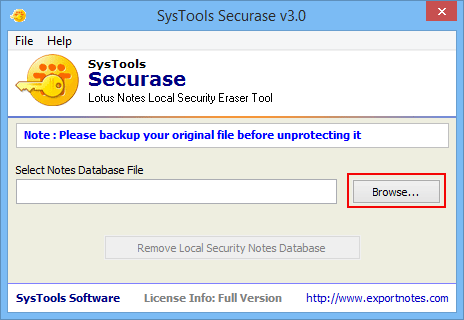
STEP 2: - Click "Browse" button to locate Lotus Notes Database having local security settings so as to remove local security.
» After Clicking "Browse" button following screen appears:
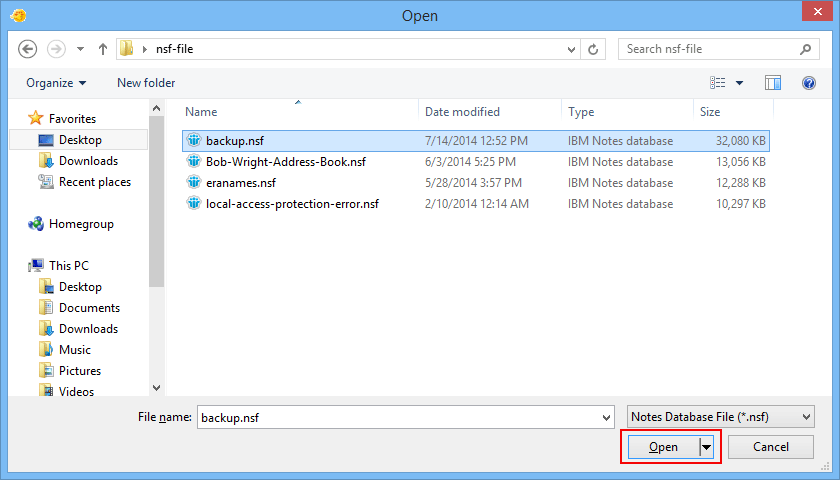
STEP 3: - Now you need to select the NSF file. Click on ‘Open’ button. Then the software will display a screen as shown below:
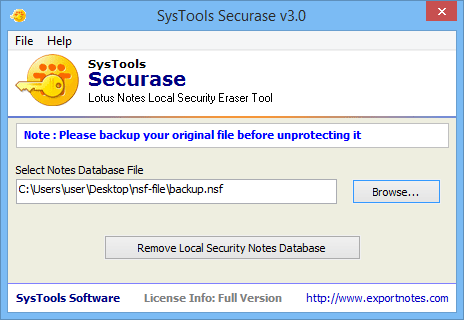
STEP 4: - Select the File and Click on "Open" Button and after selecting Lotus Notes Database, software displays screen as below:
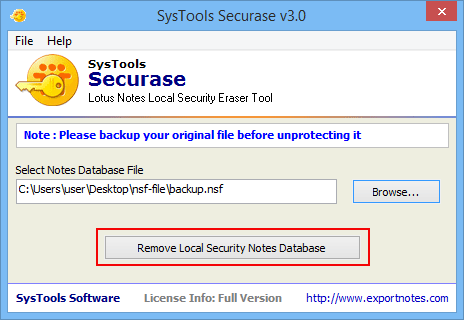
STEP 5: - Then click on Remove Local Security button. After this software will ask users if they really want to remove NSF local security or not as under:
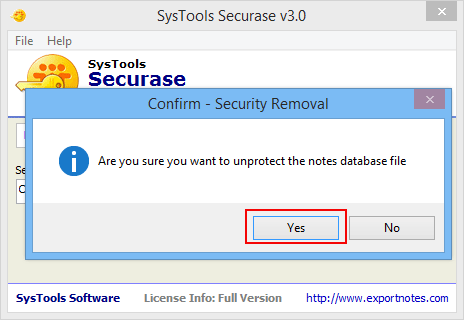
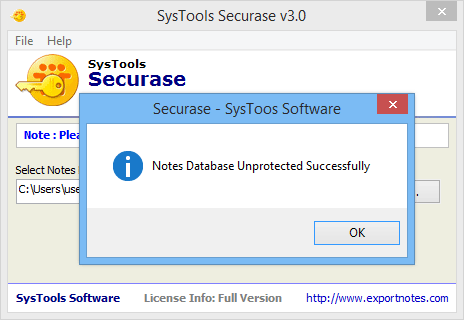
STEP 6: - Choose "Yes" to remove Local Security of Lotus Notes Database otherwise choose No. After this Software display screen showing successfull removal of local security settings as shown below:
The version of Securase Software that is downloaded from our website is fully functional. It will allow you to remove local security only from provided NSF database having security settings. However, you must purchase a product activation key to remove local security from unlimited Local NSF databases.